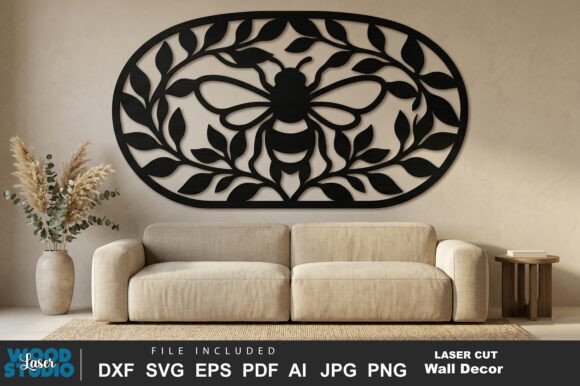
Floral Bee Laser Cut SVG File
The Floral Bee Laser Cut SVG File is a versatile digital design that brings intricate floral and bee patterns to life through laser cutting. Whether you're crafting wall art, decorative accents, or custom home decor, this file offers clean vector paths and a fully connected structure that ensures precise and professional results. Designed with both beginners and professionals in mind, it supports a wide range of materials like wood, MDF, acrylic, and more.
What Makes This Design Unique?
This Floral Bee Laser Cut SVG File stands out due to its attention to detail and usability. The artwork features:
- Clean and precise vector design – Ensuring smooth cuts without jagged edges or imperfections.
- Fully connected layout – No floating pieces mean easier assembly and fewer mistakes during the cutting process.
- No loose elements – Every part of the design is linked, reducing the need for manual adjustments after cutting.
- Easy to resize and customize – You can scale the design as needed without losing quality or detail.
These features make it an excellent choice for anyone looking to create high-quality, personalized projects with minimal effort.
Why Different Audiences Care About This Design
The Floral Bee Laser Cut SVG File can be valuable to a variety of people depending on their needs and goals. For example:
Beginners
If you're new to laser cutting, this file provides an accessible entry point. Its clean lines and connected structure reduce the learning curve, allowing you to focus on experimenting with different materials and finishes. It’s perfect for creating simple wall art or decorative pieces that look professional even with basic skills.
Experienced Users
For those already familiar with laser cutting, the versatility of this design allows for creative exploration. You can use it as a base for more complex projects, add your own embellishments, or modify the pattern to suit specific themes or events.
Creators and Entrepreneurs
Designers and small business owners can leverage this file to produce unique products for sale. From custom wall art to branded signage, the Floral Bee design adds a natural, elegant touch that appeals to a wide audience. Its compatibility with multiple formats (SVG, EPS, AI, DXF, PDF, PNG, JPG) makes it easy to integrate into various workflows and production methods.
Educators and Hobbyists
Teachers and DIY enthusiasts may find this design useful for classroom projects or personal crafts. It encourages creativity while providing a structured approach to laser cutting, making it ideal for teaching design principles or hands-on art techniques.
How to Use the Floral Bee Laser Cut SVG File
Using the Floral Bee Laser Cut SVG File is straightforward. Once you’ve downloaded the files, open them in software like Adobe Illustrator, Inkscape, or LightBurn. Adjust the size and layout as needed, then send the design to your laser cutter. The fully connected structure ensures that all parts are cut together, simplifying assembly and reducing waste.
Here are a few practical examples of how different users might apply this design:
- Home Decor Enthusiasts – Create a beautiful centerpiece using laser-cut wood or acrylic.
- Business Owners – Produce custom signage or branding elements with a nature-inspired theme.
- Artists and Crafters – Incorporate the design into larger compositions or mixed-media projects.
- Students and Educators – Use it as a project in design, art, or engineering classes to teach about precision and material properties.
Compatibility and Software Support
The Floral Bee Laser Cut SVG File works seamlessly with popular laser cutting and vector editing tools such as Glowforge, xTool, OMTech, CNC machines, LightBurn, Adobe Illustrator, and Inkscape. This broad compatibility ensures that whether you're working with a high-end machine or a beginner-level device, you can achieve consistent, high-quality results.
Additionally, the package includes multiple file formats (SVG, EPS, AI, DXF, PDF, PNG, JPG), giving you flexibility in how you use the design. For instance, the PNG and JPG files can serve as previews or templates, while the DXF format is ideal for CNC machines.
Considerations Before Using the File
Before diving into your project, consider the following:
- Material Thickness – Ensure the material you’re using is suitable for your laser cutter and adjust the settings accordingly.
- Software Proficiency – While the design is user-friendly, some familiarity with vector editing software will help you get the most out of it.
- Design Customization – If you plan to modify the design, take time to understand how each element connects to maintain structural integrity.
By keeping these factors in mind, you can maximize the potential of the Floral Bee Laser Cut SVG File and create stunning, professional-grade projects.
Whether you're an artist, entrepreneur, educator, or hobbyist, this design offers a blend of creativity and practicality that can elevate your work. With its clean structure, ease of use, and compatibility across platforms, it's a great addition to any laser cutting toolkit.